An iPad Mini in Your Pocket
Recently I was holding my iPhone Duo in its unfolded state and I needed an SMS 2FA code and I started to look around for my phone before realizing I was holding it. This has happened at least 4-5 times already and I’ve had the phone for less than a week. It constantly tricks my brain into thinking it’s an iPad Mini, not a phone. That might sound like a ringing endorsement, an iPad Mini in your pocket? Sounds great, right?
Well, that assumes I have a use for an iPad Mini.
Before the iPhone Plus/Max phones came out I used to carry an iPad Mini with me around the house. It was my “couch computer” and I used it for web browsing and a few games/apps. Once I got my iPhone 6 Plus my iPad Mini usage fell off a cliff, to the point I remember picking it up and realizing it was dead and I hadn’t used it in weeks. The iPad Mini didn’t get worse, but the iPhone got big enough that it was way more convenient to use just 1 device. The iPhone got “good enough” and the Mini fell out of use.
7 years later when the iPad Mini 6 came out I decided to treat myself and get one. I mostly regret that purchase. I was glad to have USB-C on another device, it would be another 2 years before the iPhone caught up, and the hardware is verging on flawless (jelly scrolling aside, but I guess my eyes suck too much to notice) but I just don’t have a need for an iPad Mini in my life. In fact, I don’t think I have much of a need for any kind of iPad. Well, aside from the 52 iPads I have for my side business, but for personal use? Not so much.
The iPad is a great consumption device. It is a terrible productivity device. Oh, you will find countless people online claiming to be able to do all their work on an iPad (even programmers! Well, pre-LLM that statement carried more weight but I digress). I have no doubt it’s technically possible to use an iPad to get real work done, just like you could dig a basement with a Fisher-Price shovel. For me and my house, we will use real computers.
What’s a real computer? Something running macOS, Linux, or, yes, even Windows. I’d pick Windows over iPad if I had to choose. An iPad, no matter how impressive the hardware, and yes the M-chips are amazing, is still an iPad. A poor excuse for a computing device. Usain Bolt without any legs, Michael Phelps without arms, a 3rd sportsball person without… whatever it is they use to sportsball. It has so much potential but it is impossible to realize it. iPadOS, aka iOS in a trenchcoat to try to circumvent things like the DMA, is just too limiting. You have to kit it out with a keyboard case ($$$) to make it halfway usable but it’s a compromise product. Sure, it’s great for YouTube, Netflix, TikTok, IG, etc., but I spend next to no time on those platforms and I have a TV which is better in almost every way for that purpose (video, not social media, but I don’t care about social media).
Josh! I came here to hear about the Duo, what is all this talk about iPads and iPadOS?
Well, let me answer that question by going back to the Alien vs Predator Apple Vision Pro (AVP). I wrote about my experience with the AVP in a series of posts when it first came out (1, 2, 3, 4) but to sum it up: it was an iPad you could strap to your face. With all the limits that brings. It was a technically impressive product that was hamstrung by a trash OS. Like the iPad, the AVP has its apologists, those who swear the Mac Virtual Display isn’t blurry or that they can get real work done on it. Ok. Sure. Maybe. But I can tell you that within seconds of taking off the AVP and sitting down at my MacBook I immediately felt “you are home”. My AVP was returned within the 14-day window.
So, the iPhone Duo. It is a technologically impressive product, but it’s limited not only by its OS but also its hardware.
It’s absurd that in the Year of our Lord, 2026, I can’t switch away from a tab in Safari without fear of it refreshing when I return. Just to clarify, I sometimes can’t switch between tabs in the same app without it having to unload one of the tabs from memory. This is on an iPhone Duo and iPhone 17 Pro Max. The same chip as, nay a BETTER chip than, the MacBook Neo can’t keep 2 tabs in memory. What world are we living in? Just today I swiped over to Slack from Safari to read a message, when I swiped back (<5 seconds later) my Safari tab was scrolled further up the page. Not to the top, just 25% down the page when I was closer to 50% down the page. Odd, whatever, maybe I accidentally swiped up? Nope. I was able to recreate it over and over again. Here is a video:
I’ve long been an apologist for Safari. I don’t use it on my computer but I don’t want a Chrome/Blink monoculture. Apple keeps making that harder and harder to fight against, they clearly are incapable of making a “desktop class browser” on a phone. If my desktop browser did any of this I’d immediately switch. As I write this I count 62 tabs open in my frontmost browser window, I can switch between all of them without worry. Switching between 2 tabs in mobile Safari? Yeah, that’s too hard I guess.
While we are talking about Safari, today I was reading the aforementioned page that kept getting scrolled up on me. Well, I started on my computer and thought, oh, I’ll go sit on the couch and read this on my Duo. It’s content consumption, this will be a perfect use case! I copied the URL over (thank you Universal Clipboard) and started to read before feeling like something was wrong. I picked up my 17 Pro Max and opened the same URL and… Well… see for yourself.


What is the point of a bigger screen if I see less content than on my smaller iPhone 17 Pro Max screen??? Make it make sense! And before “The website operator needs to…” STOP, I don’t care, that’s literally not my problem. This is a repeating theme on the Duo, things are bigger but I can’t see more and in some cases I see less than on my smaller iPhone. This is 100% Apple’s fault, full stop, no more discussion.
I don’t know what form foldable phones should be, passport-style like the Duo or just 2 full-sized phones stuck together? Something completely different? I’m not sure but I do know I don’t care for the Duo screens. The outer screen is miserable to use, it’s tiny, it’s like someone lopped off the top half of my phone. God forbid you open the keyboard, now you get a little window slit to peek through to see your “content” as Apple likes to call it. I understand why they moved the dock/status bar to the right side of the screen, that I have little objection to however it’s painful to lose ~3/4" to dead space when you have an app open. Even for all 5 of the apps updated to work well on the Duo, that space is underutilized and just feels like a write-off.
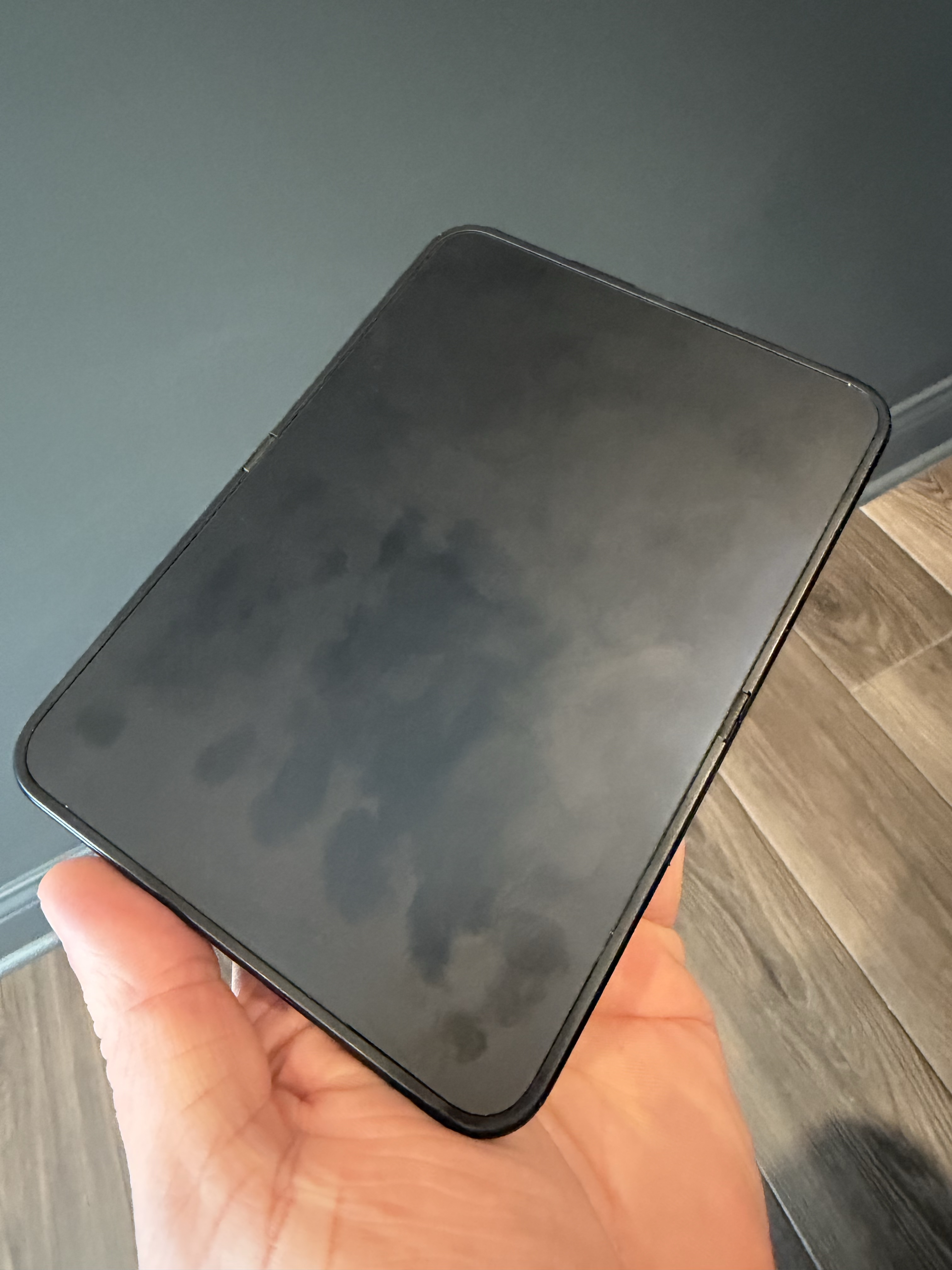
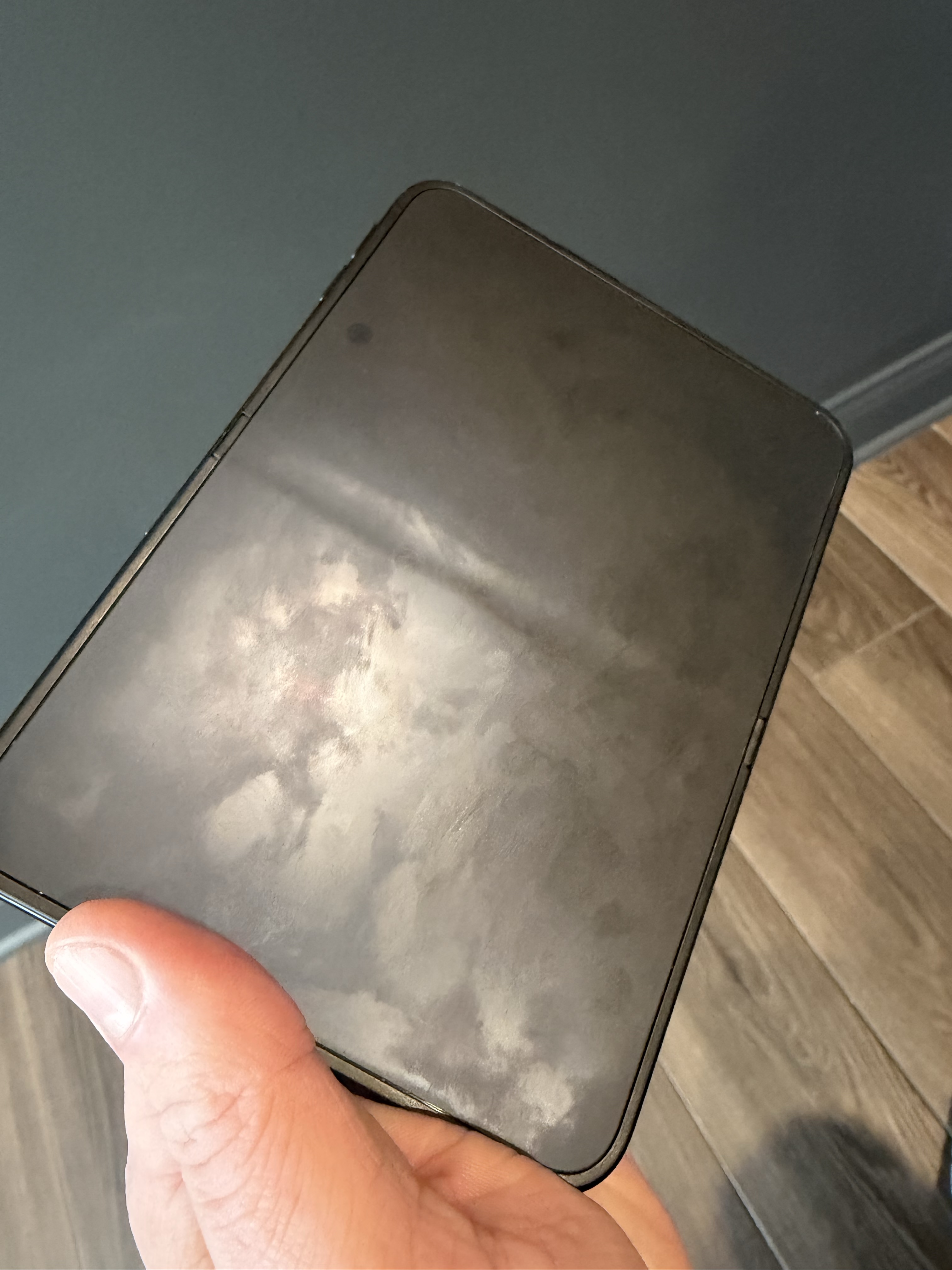
But who cares about the outer screen? That’s just a compromise after all, let’s get to the big screen! That big, beautiful, matte, streaky screen. Wait, did I say streaky? Oh, you hadn’t heard? Think of the worst “fingerprint magnet” screen you can imagine, now multiply that by 100x. Perhaps I have oily fingers but I’ve never noticed that as a problem before with any other device. The Duo seems to absorb any kind of “grease” and hold on to it. Microfiber, I’m sorry “Polishing”, cloths don’t help unless you wet them and I don’t love putting any level of water onto my electronics if I can help it. You can sort of clean it if you want to spend minutes carefully wiping the screen with trace amounts of water and light pressure but what’s the point? It will be back to looking gross at certain angles/certain light in minutes. I noticed this day 1 of having the device, to the point I thought I had permanently destroyed the screen before I found other people online talking about it.
Other than that, how was the play, Mrs. Lincoln?
Once you get past the fingerprint grease and hold it at the right angle the larger screen is really nice. The Duo feels incredibly light and thin when unfolded which is mostly a good thing, but I’ve struggled to hold it without it registering taps/touches I didn’t intend. I can’t grip it easily so I always have to support it fully from the back or put some pressure on the front/edge to hold it. That’s not the end of the world but it does make the device awkward.
Speaking of holding it, one thing I thought was clever was being able to take a “selfie” with the “good” camera (we will come back to the cameras) while being able to see yourself in the outer screen. I must have missed the small print “requires 2+ hands to operate”. I can’t figure it out, there is no way for me to hold this phone with 1 hand to take a picture. I spent a couple minutes with the family posing, impatiently, before I grabbed my mom’s 18 Pro to take the picture. I had better luck no-scoping it with the 18 than with the Duo where I could see the picture but couldn’t click the button and hold the phone at the same time. And I tried the software button and the volume button but found no way to hold the phone that didn’t risk me dropping it.
The cameras. Look, I knew going in it was going to be bad but I really miss the 4x/8x from the 17 Pro Max. I still find it jarring to open the camera app and see only .5x/1x/2x. I’m not a photographer but this really pains me. I will miss out on pictures and even the ones I can take are worse than my 17 Pro Max. I don’t have much more to say about the cameras other than they suck and they make me sad.
Something I didn’t anticipate missing was the Action Button. As I wrote that I had to pick up my Duo and look it over again to make sure I wasn’t just missing it because so often I’m hunting for “where is X button”. I have the Action Button mapped to flashlight on my iPhone 17 Pro Max and I don’t think I realized how often I use it. I keep reaching for it and remembering it’s not there. Then I have to ask Siri to turn on the flashlight, then I rethink all my decisions and what brought me to think Siri was capable, and then Siri comes back with “I can’t do that right now” or some other infuriating response. I could, and may, write a whole other blog post on the dumpster fire that is “new” Siri. But this gets back to something I said just a second ago, finding buttons. Because I use this phone in so many orientations, especially when unfolded, I never know where the buttons are and I’m always hunting for them. This leads us to the next issue: Touch ID.
“I used Touch ID for years and loved it, I’m sure it won’t be too bad” - Me, before being forced to use it again
Yep, I hate Touch ID. I should have known, I dislike it on my iPad Mini but I guess I had just accepted that and since I use the Mini so little I forget about it. Without the Apple Watch enabled as a way to unlock the phone I find the Duo unusable. With the Apple Watch unlock enabled I find the phone insecure. Watching someone pick up my phone and it unlocking for them (while vibrating on my wrist) made me incredibly uneasy. In both the Pro and Con columns you can’t fully replace Touch ID with the Apple Watch, it’s only used for unlocking the phone. If you want to sign in to a website/app you have to use Touch ID which means hunting for the button. Even when I know where the button is and anticipate needing to put my finger on the sensor I’m often too fast. If your finger is already on the sensor when the prompt comes up you have to lift and lower your finger once more or it won’t unlock. I know there’s a security reason for it, I still hate it, I get punished for anticipating the device’s needs. I can say unequivocally that I hate Touch ID and don’t like having to massively lower the security of my phone in order to make it usable (unlock with Apple Watch). Thankfully, I always wear my Apple Watch but for other people I don’t know how they are avoiding going crazy.
Well, now I’m deep into this post and I still haven’t touched on half of my issues. Time for a speedrun:
- Unintended input is the name of the game with the Duo. I’ve never had so many accidental taps in my life. It’s made worse when I close the phone and it’s like I’ve left a toddler with my phone unlocked. I look at the outer screen befuddled at how XYZ app got launched or why I’m in a settings screen. I need to set up a shortcut to lock the phone when I close it.
- Unfolding the phone is a commitment. It sounds silly but I find myself asking “is it worth unfolding” more often than you’d think. Part of this is because holding it is a delicate operation so I have to make sure I have 2 hands free and will have 2 hands free for the whole time I’m using it.
- The app situation is dire. The handful of apps that have updated are essentially just the iPad app scaled, very few apps actually make use of the Duo’s screen.
- Using an app on the outer screen then switching to the inner screen with the app open is a gimmick. The animation is cool the first time, I stopped caring on the second unfolding. I very rarely start on the outer screen and then move to the inner. When I pick up the phone I already know if I’m going to open it or struggle through using the outer screen.
- There are only 2 ways I use this: the small, terrible outer screen or the differently terrible inner screen. All the other styles (laptop mode, tent mode, open book mode) are gimmicks with zero real use other than to look at once and go “Ok, I guess it can do that”.
- Multitasking is 100% natural, I picked it up in seconds without any “training”/instruction, unlike the iPad, too bad it’s only useful in landscape mode which I use as little as possible because the keyboard takes up too much of the screen.
- I’ve always been careful with my phones but this one is on a whole other level. I don’t throw it on the couch/bed, I have to set it down gently, and while it’s IP68 rated, they don’t tell you that doesn’t apply to the hinge, only the sealed 2 halves. Guess how all those screens are breaking? One leading (proven?) theory is a failure in the hinge that hits (and breaks) the screen when it fails. So yeah, just don’t get anything in the delicate hinge mmk? But sure “IP68”, what a crock of shit.
For years now I’ve been disappointed with the limitations of my phone, the computer is where I do anything worthwhile and I regularly get annoyed when I try something on my phone only to pull the ripcord partway through and go finish on my computer. I had hopes for the AVP and the Duo that they might fill a space in my spectrum of tasks that the phone or computer don’t currently cover but it’s mostly a shitty phone plus an iPad and I don’t care much for iPads so…
I’ve purchased/borrowed/leased/whatever every iPhone since the 3GS which I bought on my 18th birthday. I’ve used every new piece of Apple tech for over 2 decades and while I have zero interest in Android, I can’t help but look around and think “this isn’t for me”. The Apple Vision Pro, the HomePod, the HomeView, the iPhone Duo, most iPads. Even the flagship phones have been ho-hum for a number of years now. My Cosmic Orange iPhone 17 Pro Max is the phone I’ve enjoyed the most in many, many years and that’s 80% because of the color. Maybe this is just a “come-to-Jesus” moment for me, realizing the phones don’t interest me, that locked-down, limited phones from a company hell-bent on fucking over developers aren’t something I care as much about anymore. My phone is simply a satellite to my laptop in the majority of use. The Duo actually pushed me even further towards using it as a satellite/companion device because of the small outer screen and the keyboard stealing so much space on both screens.
Looking at my Screen Time on the Duo is hilarious. It’s pretty much all Safari and Heeler (remote app for Herdr) with a sprinkling of games I’ve tried. The games are cool but I know my interest in those will wane, it always does, if I want to really play a game I’ll use my Steam Deck. I just can’t figure out where the Duo fits in my life.
My current plan is to continue to daily-drive this phone until Thursday which will mark 1 week of having the phone and then switch back to my iPhone 17 Pro Max. Unless I feel a sense of loss I’ll return the Duo. I have a feeling that when I go back to my 17 Pro Max I’ll have the “I’m home” feeling.